Free and open source · Private by design
See where your day actually goes.
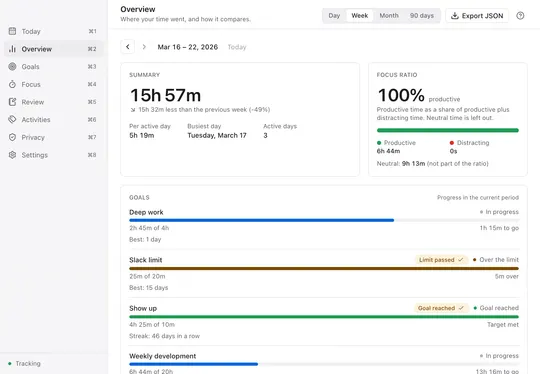
Kaiflow quietly records the app and window in front of you and turns your day into a clear timeline, with no timers, no account and your data on your computer.
Requires macOS 13 or later. Universal build for Apple silicon and Intel.
Free. Not notarized by Apple — the first time, open it from System Settings → Privacy & Security.See the first-open steps
What you get
Automatic timeline
Every app and window you use, recorded in the background. Nothing to start or stop.
Goals and streaks
Daily or weekly targets to reach, or limits to stay under, with streaks.
Focus timer in the menu bar
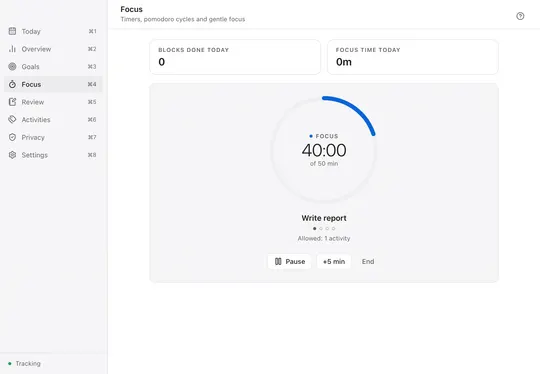
Set an intent and a countdown. A gentle alert appears if you drift.
Weekly review, optional AI
A calm summary of your week. Add AI insights only if you ask.
Your time is yours. So is the data.
Only the app in front and its title
Never your screen, keystrokes, clipboard or files.
Stored locally, no account
Nothing leaves your computer except the update check and the AI review, if you run it.
Open source, MIT
Free forever. Read the code, use it for any work.
Want to change it? Fork it: the repository ships a guide for AI coding agents.Read AGENTS.md
Download and install
Free, on GitHub Releases. Windows and Linux are beta: they track the same way but have had less testing.
macOS
AvailableUniversal DMG for macOS 13 or later
DownloadWindows
BetaInstaller (.exe) or MSI for Windows 10 and 11
Download the betaLinux
BetaAppImage or .deb. Full tracking on X11
Download the beta
First time opening it?
macOS
- macOS 15 or later: open Kaiflow, click Done, then go to System Settings → Privacy & Security and click Open Anyway.
- macOS 13 and 14: in Applications, right-click Kaiflow and choose Open.
- Allow Accessibility when asked to record window titles. Without it, app names are still recorded.
Windows
- The installer is not code-signed. If SmartScreen appears, click More info → Run anyway.
- Kaiflow lives in the system tray, next to the clock.
Linux
- Make the AppImage executable and run it, or install the .deb on Ubuntu 22.04, Debian 12 or later.
- On GNOME, the tray icon needs the AppIndicator extension.
chmod +x Kaiflow_*.AppImage && ./Kaiflow_*.AppImage
sudo apt install ./Kaiflow_*.deb
Questions and answers
Is it free?
Yes. Kaiflow is free and open source under the MIT license, including for commercial work. There is no account, no subscription and no paid tier.
Why does macOS warn me when I open it?
Kaiflow is not notarized by Apple, which requires a paid developer account, so macOS warns about it like any app it has not checked. Open it once from System Settings → Privacy & Security and macOS remembers your choice.
Where is my data stored?
In a local database on your computer (on macOS, ~/Library/Application Support/com.carlosleon.kaiflow/). Export it as JSON, restore a daily backup or delete any range at any time.
Does it work on Linux with Wayland?
Partly. Wayland does not let apps see which window is in front, so only idle, lock and sleep are recorded. Choose an X11 session at login for full tracking.